Installation qualification for rpact 4.5.0.9315 has not yet been performed.Please run testPackage() before using the package in GxP relevant environments.As part of the regulatory requirements in GxP environments, the Installation Qualification (IQ) of software is a critical process to ensure that a system is installed correctly and works as intended in the target environment. In the case of the rpact package, the Installation Qualification is performed through the testPackage() function, which provides an essential validation mechanism for ensuring the package meets the required standards. When you run this function, more than 37,000 unit tests are performed and the overall test result is presented in a small report.
From release version 4.1.1 of rpact, a significant change has been introduced regarding the execution of unit tests. Only a single test case remains in the package, which informs users that the unit tests have been moved and are no longer included by default. Full access to all unit tests is restricted to paying customers who possess the necessary credentials (token and secret). These credentials are included in the user-specific rpact validation documentation, provided to all members of the RPACT User Group for each release.
This vignette explains how to perform the Installation Qualification for rpact and highlights the recent changes to the testing process.
From release version 4.1.1 of rpact, we have streamlined the testing process by moving the full set of unit tests to a private repository. This ensures that testing is both efficient and compliant with CRAN requirements, while maintaining strict adherence to GxP standards. Only paying customers have access to the complete unit test suite, as part of the installation qualification (IQ). The tests are executed automatically through the testPackage() function, and a local or server-based execution of these tests is a crucial step to validate rpact for use in regulated environments.
If you have already conducted your installation qualification using the testPackage() function, nothing changes for you. However, if your IQ was done without using testPackage(), we recommend using the setupPackageTests() function to ensure that the full set of tests is integrated into your local rpact installation. This approach provides you with the flexibility to run the tests using your own testing pipeline, ensuring that the package is fully qualified for use in regulated environments (see section Setup Complete Test Suite of rpact below).
testPackage() for Installation QualificationThe testPackage() function is designed to run all the necessary unit tests for validating the installation of rpact. It can download and execute a full set of tests or a subset, depending on the user’s needs and access credentials.
testPackage(
  outDir = "/path/to/output", # absolute path to the output directory
  completeUnitTestSetEnabled = TRUE,
  types = "tests",
  connection = list(
    token = "my_token",
    secret = "my_secret"
  )
)
Note that the outDir parameter must be an absolute path or "." (current working directory). By default, the current working directory is used.
Alternatively, you can run the following code to execute the installation qualification:
setwd("/path/to/output")
testPackage(
  completeUnitTestSetEnabled = TRUE,
  types = "tests",
  connection = list(
    token = "my_token",
    secret = "my_secret"
  )
)TRUE, all existing unit tests will be executed. If FALSE, only a subset of the tests will run."tests", "examples", and "vignettes". By default, only the unit tests are run.token and secret. These credentials provide access to the full set of unit tests and are necessary to fulfill regulatory requirements. Credentials change for every rpact release and are provided in the appendix of the user-specific validation documentation (see Fig. 1).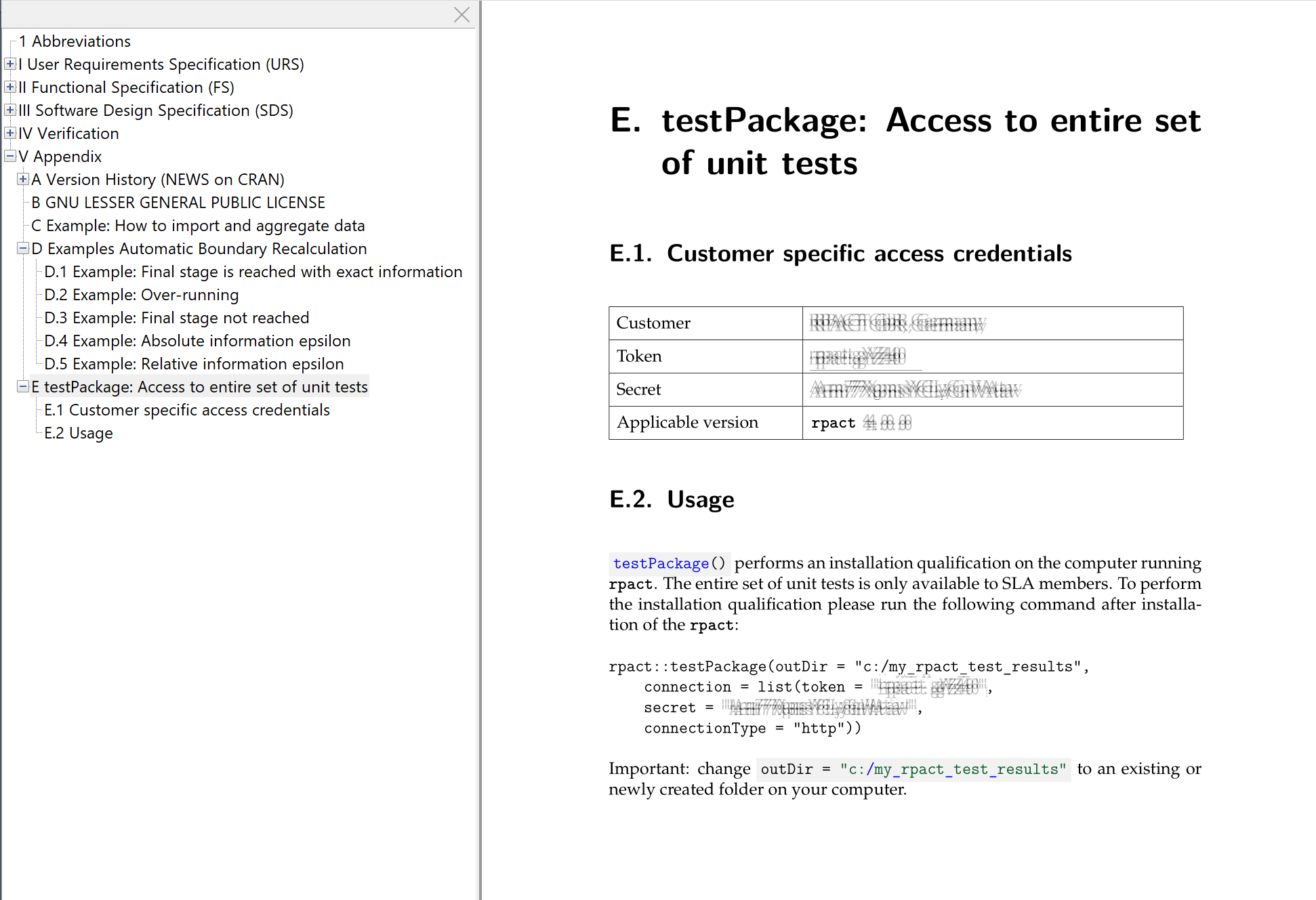
When you execute testPackage(), the function creates a subdirectory named rpact-tests in the specified output directory. It then downloads all unit test files from a private repository and copies them to this newly created directory. The full set of tests (or a subset, depending on the parameters) is executed using the built-in testInstalledPackage() function from the tools package. All test results are saved in the file testthat.Rout, located in the rpact-tests directory.
In most environments, the recommended approach is to let testPackage() download and execute the complete unit test suite in one step. In some company environments, however, direct access to the private test repository is blocked by internal network restrictions, proxy settings, firewall rules, or limitations of the validated execution environment. In such cases, the complete test suite can be downloaded in a separate environment and then transferred manually to the system where the Installation Qualification (IQ) must be performed.
This process is especially useful if the validated system cannot download the test files directly, but another company-approved computer, for example a local laptop, can access the test repository using the release-specific credentials.
The process consists of three steps:
rpact-tests directory to the target validation environment, e.g., /home/user/project/rpact-tests.Note that in the target directory you should see at least the file
testthat.Rand a sub-foldertestthatcontaining the different test R files.
The same rpact release must be used for downloading and executing the tests. The credentials (token and secret) are release-specific and must match the installed rpact version. For example, credentials provided for rpact 4.4.0 must be used with rpact 4.4.0.
On a computer that can access the private test repository, install and load the required rpact version and run testPackage() with downloadTestsOnly = TRUE:
testPackage(
  outDir = "/path/to/download/location",
  completeUnitTestSetEnabled = TRUE,
  downloadTestsOnly = TRUE,
  connection = list(
    token = "my_token",
    secret = "my_secret"
  )
)
This command downloads the complete unit test suite but does not execute the tests. It creates a directory named rpact-tests in the specified outDir. This directory contains the test files that need to be transferred to the target validation environment.
Using testPackage(..., downloadTestsOnly = TRUE) is appropriate for this purpose. It is often more convenient than using setupPackageTests() when the objective is to download the test files into a defined working directory and then move them to another system.
Copy the complete rpact-tests directory to the environment in which the IQ shall be performed, for example to a project directory on Posit Workbench, RStudio Server, or another validated Linux environment.
Do not copy individual files selectively. The complete directory structure must be preserved. After the transfer, the target environment should contain a directory such as:
/home/user/project/rpact-testsThe testFileDirectory argument must point to this directory.
In the target validation environment, install and load the same rpact version that was used for downloading the tests. Then execute:
testPackage(
  outDir = "/home/user/project",
  completeUnitTestSetEnabled = TRUE,
  testFileDirectory = "/home/user/project/rpact-tests"
)
We recommend using an absolute path for testFileDirectory. In addition, the path should be specified without a trailing slash. For example, use:
testFileDirectory = "/home/user/project/rpact-tests"instead of:
testFileDirectory = "/home/user/project/rpact-tests/"This avoids possible path handling issues in restrictive or platform-specific environments.
The console output (see testthat.Rout or testthat.Rout.fail in the specified folder) alone is not sufficient for reviewing all details of the IQ run. After execution, check the generated report file in the test result directory:
rpact_test_result_report.mdNote that in case of successful rendering only the html and pdf version of this document will be available.
This file contains the detailed results of the test execution, including the details of failed tests if any failures occurred. The console output usually only shows a compact summary, for example the number of passed and failed tests.
A successful complete IQ run should execute the full test suite. If only a very small number of tests is executed, for example approximately 100 tests instead of the complete suite, the complete unit test set was most likely not available to the test runner. In that case, check the following points:
rpact version matches the version for which the credentials were issued.rpact-tests directory was copied completely, including all subdirectories and test files.testFileDirectory points to the transferred rpact-tests directory.testFileDirectory.rpact_test_result_report.md (or rendered html or pdf version) is reviewed for detailed diagnostic information.Running testthat::test_check() directly is not recommended for the complete rpact IQ unless the complete test suite has first been installed or made available in exactly the location expected by the test runner. If the complete test files are missing, testthat::test_check() may fail with messages such as No test files found or may execute only the small basic test subset that is included in the public package installation. In that case, the package has not yet been qualified for GxP use.
The setupPackageTests() function ensures that the required test files are securely downloaded and integrated into the local rpact installation. By doing so, users can use their own test pipeline instead of relying on the testPackage() function to execute the tests.
The setupPackageTests() function performs the following operations:
rpact package directory and its necessary subdirectories (tests and testthat).token and secret), the function downloads the complete test suite to a temporary directory. It then copies the tests into the appropriate subdirectories of the local rpact installation.token: A string used for authentication during the download of the test suite.secret: A string used for secure authentication alongside the token.By leveraging the setupPackageTests() function, users gain access to the following benefits:
rpact environment, supporting regulatory compliance.To execute the setupPackageTests() function, ensure you have valid credentials (token and secret) obtained as part of the rpact release. These credentials are unique for every release and are provided in the accompanying rpact validation documentation (see Fig. 1), which is shared with members of the RPACT User Group.
Once the test suite is installed using setupPackageTests(), you can use your custom pipelines to perform the installation qualification. If you encounter any issues, we recommend reaching out to the RPACT support team for assistance.
For GxP-compliant environments, running the installation qualification is a mandatory step to ensure that rpact is functioning correctly. The IQ process verifies that the software is installed in a validated state and can be trusted for use in clinical and other regulated research settings.
The rpact validation documentation is over 7,000 pages long and details the formal validation of the package. This documentation, together with the IQ performed using testPackage(), forms the basis for ensuring that rpact is fully validated for use in regulated environments.
When loading the rpact package in R, the following message will be displayed by default if the installation qualification (IQ) process has not yet been performed:
Installation qualification for rpact 4.5.0.9315 has not yet been performed.Please run testPackage() before using the package in GxP relevant environments.This message serves as a reminder to ensure that the rpact package has undergone the necessary validation steps before being used in GxP-relevant environments. The message will continue to appear every time the package is loaded until the testPackage() function has been successfully executed.
If desired, the reminder message can be suppressed using one of the following methods:
Suppress Startup Messages: Load the package using suppressPackageStartupMessages() to prevent the message from being displayed:
suppressPackageStartupMessages(library(rpact))Disable centrally for all users / sessions: The package also provides a dedicated command to disable the startup reminder centrally:
?rpact::disableStartupMessages
rpact::disableStartupMessages()
This function sets the option
options(rpact.startup.message.enabled = FALSE)and stores this option persistently.
As an alternative, the same option can be configured globally in R startup files before users load or use the package. In particular, system administrators can add
options(rpact.startup.message.enabled = FALSE)to the site-wide R startup profile Rprofile.site. This file is located in
file.path(R.home("etc"), "Rprofile.site")and is evaluated when R starts. Therefore, defining the option there ensures that the startup reminder is disabled automatically for all users and sessions using that R installation, for example in centrally managed server or Docker environments.
User-specific startup files such as ~/.Rprofile can also be used, but these settings apply only to the respective user.
As part of the testPackage() function execution, a detailed Installation Qualification (IQ) report is automatically generated to document the testing process and its results. This report is a key deliverable in the validation workflow, ensuring that the rpact package meets the necessary requirements for GxP-compliant environments.
The IQ report provides the following key sections:
rpact in regulated environments.rpact package version and release dateThe report is automatically generated in two formats:
Both formats are saved to the directory specified by the user argument outDir after running testPackage().
The Installation Qualification report is intentionally designed to be audit-friendly and easy to align with company-specific documentation conventions. Two areas are commonly customized:
Note
The functionality described in this section is available in rpact versions newer than 4.3.0. Please ensure that you are using an up-to-date rpact release when relying on report customization and metadata persistence.
reportFileBaseNameUse reportFileBaseName to control the base name of all generated report files (without path and without extension). The report files are still written to outDir.
Typical outputs (depending on reportType) are:
<reportFileBaseName>.html<reportFileBaseName>.pdfExample: add an ISO-like timestamp suffix
testPackage(
  reportFileBaseName = paste0(
    "rpact_test_result_report_",
    format(Sys.time(), "%Y-%m-%d_%H-%M-%S")
  )
)
This will generate, for example:
rpact_test_result_report_2026-02-04_10-50-21.htmlrpact_test_result_report_2026-02-04_10-50-21.pdfmetaDataUse metaData to add arbitrary tag–value pairs to the report. This is useful to capture organization-specific information (e.g., container name, host name, ticket IDs, or qualification purpose) without having to post-process the report.
testPackage(
  testFileDirectory = file.path(getwd(), "tests"),
  metaData = list(
    `Purpose` = "Pre-release check",
    `Company` = "RPACT GmbH, Germany",
    `Container Name` = "2026_Container",
    `Hostname` = Sys.info()[["nodename"]],
    `Qualification ID` = "IQ-2026-0007",
    `Executed By` = Sys.info()[["user"]],
    `Git Commit` = Sys.getenv("GITHUB_SHA", unset = NA_character_)
  ),
  reportFileBaseName = paste0(
    "rpact_test_result_report_",
    format(Sys.time(), "%Y-%m-%d_%H-%M-%S")
  )
)
Notes:
OS, HOSTNAME, CONTAINER_NAME, etc.metaDataFileIf you want to keep metadata under configuration management (e.g., in a repository or validated document set), you can provide it via a simple text file using metaDataFile.
The expected format is one entry per line:
KEY=VALUEExample file qualification_metadata.txt:
Container name=2026_Container
Host name=my_host
Purpose="Pre-release check"
You can create such a file programmatically using writeKeyValueFile() and read it back with readKeyValueFile():
metaDataFile <- file.path(getwd(), "qualification_metadata.txt")

writeKeyValueFile(
  keyValueList = list(
    `Container name` = "2026_Container",
    `Host name` = "my_host",
    `Purpose` = "Pre-release check"
  ),
  filePath = metaDataFile,
  safeKeyCheck = FALSE # allow keys with spaces
)
The content of qualification_metadata.txt will look like this:
# Generated by rpact::writeKeyValueFile() on 2026-02-18 09:33:43 +0100
# Format: KEY=VALUE (comments start with # or ;)

Container name=2026_Container
Host name=my_host
Purpose="Pre-release check"
Then you can pass the file path to testPackage():
testPackage(metaDataFile = metaDataFile)If you provide both metaData and metaDataFile, testPackage() will write the entries from metaData to the file specified by metaDataFile. This allows you to persist the metadata and reuse it in subsequent runs by passing only metaDataFile (and omitting metaData).
In other words: use metaData to define metadata programmatically, and metaDataFile to store and reuse it across qualification runs.
Typical workflow:
metaData and metaDataFilemetaDataFileThe IQ report serves as a comprehensive record of the validation process. It should be reviewed carefully to ensure all tests have passed successfully. Any failed tests or warnings should be addressed promptly, as these could indicate potential issues with the rpact installation or its compatibility with the system environment.
For more information on resolving issues or interpreting the results, consult the official rpact documentation or reach out to the support team at .
Maintaining an up-to-date IQ report is essential for compliance with GxP regulatory standards. It demonstrates that the software has been installed and validated correctly, providing confidence in its reliability and suitability for critical applications.
Performing the installation qualification using the testPackage() function is essential for validating rpact in GxP environments. Access to the full set of unit tests is restricted to members of the RPACT User Group, who receive user-specific credentials with each release. These credentials, combined with the validation documentation, ensure that the package can be securely and compliantly used in regulated settings. For more information, please visit: www.rpact.com/services/sla.
If you have any questions or need further assistance, please reach out to us at www.rpact.com.